Video SEO Is Becoming AI Search SEO: A Practical YouTube Visibility Playbook For 2026




Table of Contents (Click to show/hide)





YouTube SEO is starting to mean more than "get the video to rank inside YouTube."
That still matters. It might matter even more now.
Google is testing Ask YouTube, a conversational search experience that can return AI-generated summaries, cited videos, timestamped video results, related long-form videos, Shorts, and follow-up questions in the same thread. In plain English, YouTube search is starting to look less like a list of thumbnails and more like an answer interface.
That changes the job of video SEO.
If YouTube and Google are going to summarise topics and cite source videos, the question is not only "can my video rank?" The better question is: can my video and the page around it be understood well enough to become a useful source?
That does not mean YouTube has published Ask YouTube citation factors. It has not. Nobody outside YouTube should pretend they have a secret checklist for becoming the main cited video in an AI-generated answer.
YouTube search is clearly moving toward AI-assisted answers, so video SEO needs to prepare for that shift.
Ranking higher in YouTube, using clearer metadata, structuring the video properly, and supporting important videos with crawlable owned pages should make your content easier to discover, understand, summarise, and cite in future AI-search experiences.

The Direct Answer
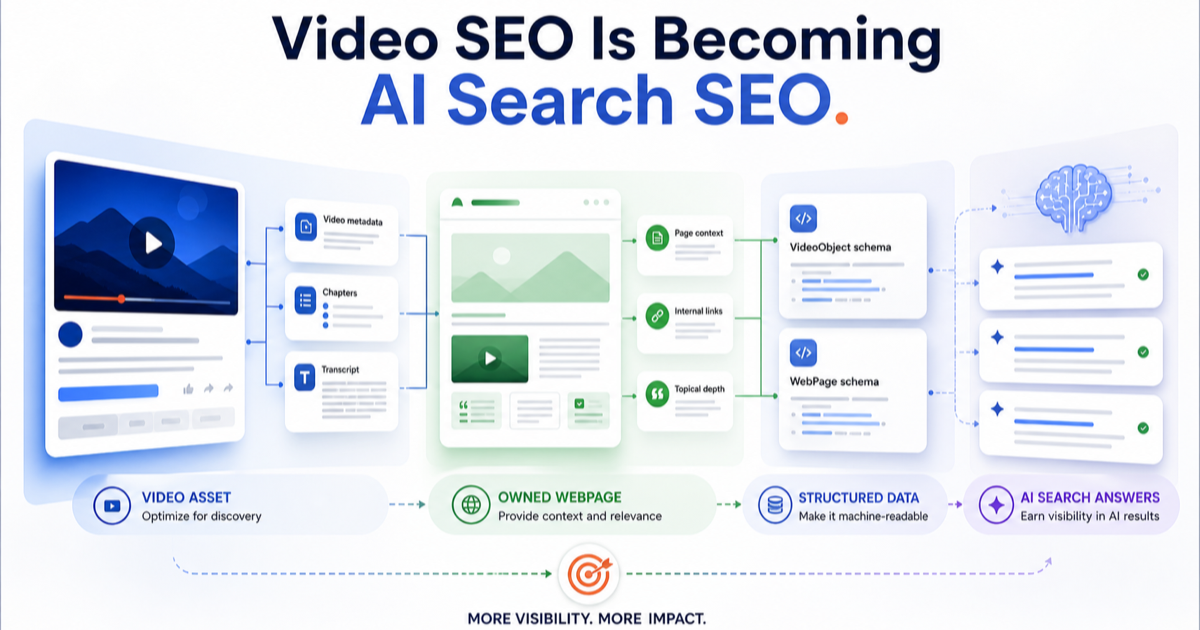
Video SEO in 2026 means optimizing the YouTube asset first, then strengthening the owned page around it when the video is embedded on your website.
The YouTube-side work is still the familiar stuff: title, description, thumbnail, chapters, topic relevance, audience retention, and engagement.
The owned-site work is different. If you embed the YouTube video on a page you control, that is where transcript HTML, VideoObject schema, internal links, page context, direct-answer copy, and summary-friendly formatting become available.
You cannot edit YouTube's HTML. You cannot add your own VideoObject schema to a YouTube watch page. You can only control your upload metadata inside YouTube and the supporting page experience on your own site.
That distinction matters because a lot of video SEO advice mushes the two together.
The practical playbook is:
- Make the YouTube video easy to rank and click.
- Make the owned embed page easy to crawl, understand, and summarize.
- Connect both with consistent entities, clear internal links, and useful text around the video.
Why Video SEO Is Shifting Toward AI Search
Search Engine Journal reported that Google's Ask YouTube experiment returns AI summaries with cited videos and supports follow-up questions in a persistent thread. Source videos can appear as embedded results that open at timestamped sections.
That is the important part for marketers.
The old mental model was simple:
- User searches YouTube.
- YouTube returns a list of videos.
- The best title, thumbnail, and ranking signals win the click.
The emerging model is more layered:
- User asks a natural-language question.
- YouTube returns a generated answer.
- Videos become supporting sources, timestamped proof, or related exploration paths.
- The user keeps asking follow-up questions without restarting the search journey.
That does not make traditional YouTube SEO obsolete. It makes it foundational.
If your video cannot rank, hold attention, and clearly signal what it is about, it is unlikely to become more visible in AI-shaped search experiences. If your embedded page has no transcript, no direct answer, no schema, and no surrounding context, Google has less stable text to work with when understanding the page.
So the goal is not to chase a magic AI ranking factor.
The goal is to remove ambiguity.
The Two Jobs Of Video SEO In 2026
Video SEO now has two connected jobs. One lives inside YouTube. The other lives on the page you control.
Most teams over-focus on the first job.
They upload the video, write a keyword-heavy title, add a description, maybe add tags, and move on. That can still work if the YouTube result itself is the only thing that matters.
But if the video supports SEO, lead generation, education, product discovery, or a commercial content hub, the owned page matters too.
The page gives search systems context that the video alone may not make obvious. It can explain who the video is for, what problem it solves, which tools and platforms it covers, what steps the viewer should take, and how the video relates to the rest of your site.
That is where video SEO starts to become AI search SEO.
Metadata Still Matters, But It Needs A Clearer Job
The basic YouTube upload fields still matter. They just need to be written for clarity, not decoration.
Title
The title should make the topic and outcome obvious.
Bad title:
My 2026 YouTube Growth Thoughts
Better title:
YouTube SEO Checklist For 2026: Titles, Chapters, Transcripts, And AI Search
The better version gives YouTube, Google, and the user a clearer promise. It also matches how people search: youtube seo checklist, video seo best practices, youtube title best practices, and similar queries.
Description
The description should not be a dumping ground for links. Use it to summarise the video in plain language.
A useful description should cover:
- What the video answers.
- Who it is for.
- Which entities, tools, or platforms are discussed.
- The main steps or sections.
- A link to the supporting page when one exists.
If the video is embedded in a blog post or guide, link to that page from the description. That gives users a deeper resource and reinforces the relationship between the YouTube asset and the owned page.
Chapters
Chapters make the video easier to navigate. They also make the video easier to segment.
That matters when search experiences can point users to a specific timestamp. A 14-minute video with no meaningful chapters is harder to scan than a video with clear sections like:
00:00 Video SEO in 202602:10 YouTube title and description basics05:45 Transcript and page context09:20 VideoObject schema on owned pages12:30 Final publishing checklist
Do not write cute chapter labels. Write labels that explain what the section is about.
Thumbnail
The thumbnail's job is not to be loud. Its job is to make the click feel safe.
For educational and B2B content, the best thumbnail usually clarifies the outcome:
Video SEO ChecklistYouTube + AI SearchFix Low CTRSchema + Transcript
If the thumbnail promises drama but the video is a practical guide, it may win the wrong click. That can hurt retention and trust.
Tags
Tags are not the strategy.
Use them if they help disambiguate the topic, spelling, brand, or related terms. Do not spend half the production meeting arguing about tags while the title, description, thumbnail, chapters, transcript, and page context are weak.
That is not video SEO. That is procrastination in a settings panel.
The Owned Page Around The Video Is The AI Search Asset
When you embed a YouTube video on your own website, the page around the video becomes part of the SEO system.
This is where many teams leave value on the floor.
They embed the video, add one lazy paragraph, and publish. The user sees a video. Search sees a thin page with an iframe and barely any context.
That is not enough for a serious SEO asset.
For important videos, the owned page should include:
- A clear H1 and intro that explain the problem.
- A direct answer near the top.
- The embedded YouTube video.
- A transcript or detailed summary in HTML.
- Descriptive subheads that match real user questions.
- Internal links to related pages.
- Source links where claims need support.
VideoObjectstructured data where appropriate.
The page does not need to become a bloated transcript dump. It needs enough crawlable context to explain the video.
For example, if the video is about YouTube SEO, the page should clearly mention the concepts that matter:
- YouTube title optimiaation.
- Video descriptions.
- Chapters and timestamps.
- Thumbnails.
- Transcripts.
- Embedded video pages.
VideoObjectstructured data.- AI search summaries and cited videos.
If those concepts only exist inside the audio of the video, you are making search systems work harder than they need to.
The Owned-Site Technical Layer: VideoObject, Thumbnails, And Indexing
This section applies to pages you control. It does not apply to YouTube's own watch page.
If you embed a YouTube video in an article, guide, product page, or resource page, check the technical layer before you call the page finished.
Add VideoObject Structured Data Where It Fits
Google's video structured data documentation explains how VideoObject can help Google understand video content on a page.
For an owned page with an embedded video, useful VideoObject fields can include:
namedescriptionthumbnailUrluploadDatedurationembedUrlcontentUrlwhere appropriate
Do not add schema that overstates what is visible on the page. The structured data should describe the video and page honestly.
If the visible page says almost nothing about the video, schema will not magically turn it into a strong content asset.
Add WebPage Schema Alongside VideoObject
Yes, I would add WebPage schema alongside VideoObject.
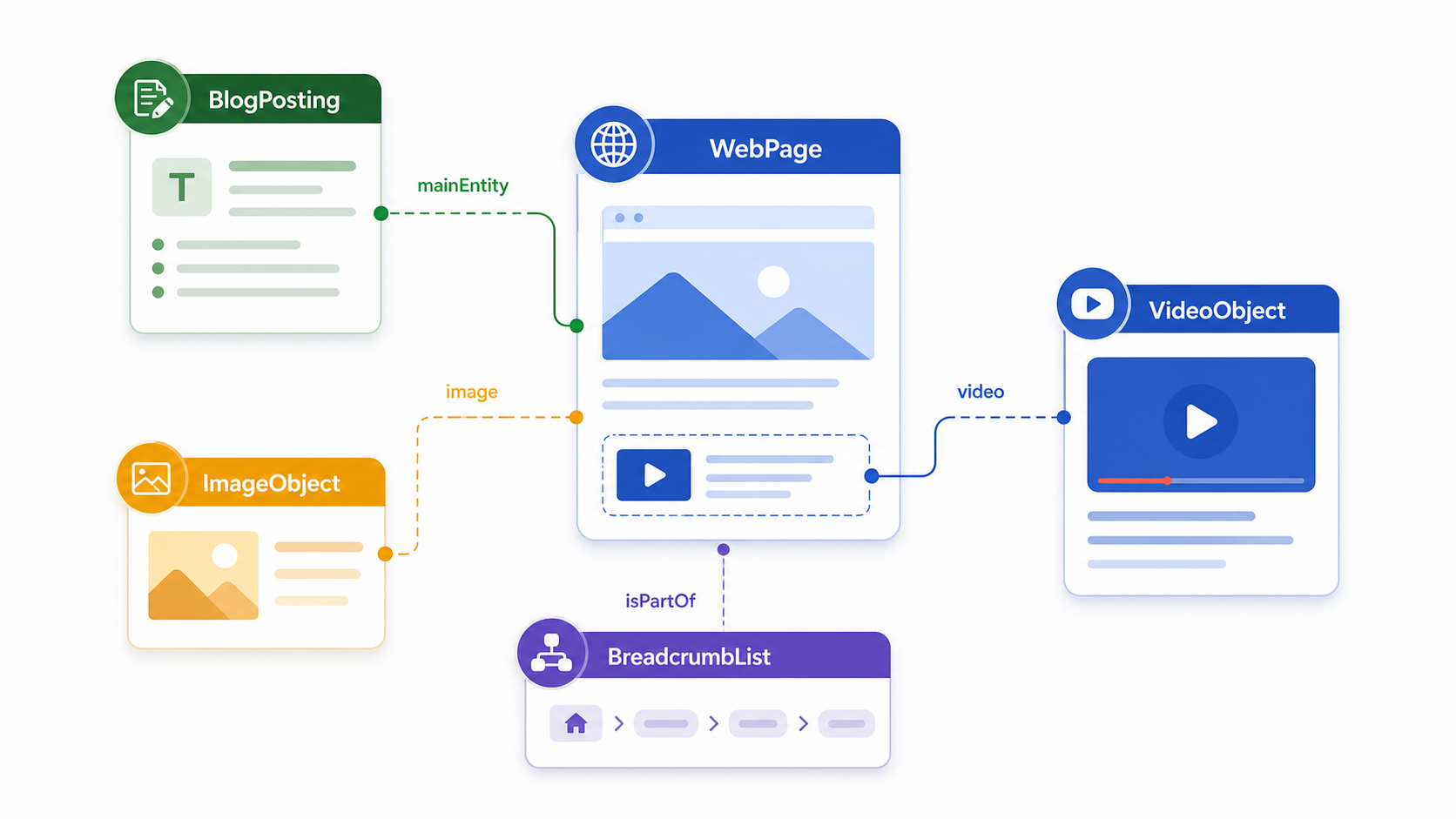
The VideoObject describes the embedded video. The WebPage describes the page that contains it: the URL, page name, description, primary image, breadcrumb, publisher, and relationship to the article.
That makes the page wrapper clearer.
For a blog post with an embedded YouTube video, the clean setup is usually a JSON-LD graph:
WebPagefor the owned URL.BlogPostingfor the article content.VideoObjectfor the embedded video, only when the page actually includes a video.BreadcrumbListif the site template supports breadcrumbs.
The important detail is relationship. The BlogPosting should point to the WebPage as mainEntityOfPage. The VideoObject should describe the visible embedded video. If the video is part of the article, the article can reference it as a video asset.
Do not add VideoObject just because the topic is video SEO. Add it when there is an actual video on the page.
Keep The Video Page Crawlable
The page that embeds the video should be indexable, canonicalized correctly, and internally linked from relevant pages.
Check the basics:
- The page is not blocked by
noindex. - The canonical points to the correct URL.
- The video is visible on the page.
- The page has crawlable supporting text.
- The thumbnail URL is accessible.
- The page loads cleanly on mobile.
Google's video best-practice documentation repeatedly comes back to the same practical idea: make videos discoverable on indexable pages and give Google enough information to understand them.
Decide Whether This Is A Watch Page Or A Supporting Article
Google's video documentation distinguishes between a dedicated watch page and a broader page where the video supports the surrounding content.
That distinction is useful.
If the video is the main asset, build a dedicated watch page: one primary video, a unique title, a clear description, stable thumbnail, structured data, and supporting context.
If the video supports a broader blog post or guide, do not pretend the page is only a video page. Make the article strong in its own right, embed the video clearly, and use the surrounding text to explain the topic.
Both setups can be useful. The mistake is publishing a weak in-between page: not enough video focus to be a proper watch page, and not enough text to be a strong article.
Put The Transcript Or Summary In HTML
If the transcript matters, put it in HTML on the page.
Do not rely only on the video file, the YouTube player, or text hidden in places a normal user never sees.
For long videos, a full transcript may be too heavy for the main article body. In that case, use a detailed summary with key sections, then include the transcript lower on the page, behind a clean accordion, or on a supporting transcript page if that fits the site.
The principle is simple: the page should contain enough stable text for a user and a search system to understand what the video actually covers.
The AI Search Layer: Make The Answer Easy To Extract
AI search systems need source material they can interpret.
That means your page should not force them to infer everything from a video embed.
Use direct, extractable formatting:
- Put the direct answer before the long explanation.
- Use descriptive subheads.
- Create concise checklists.
- Use comparison tables where they clarify decisions.
- Name tools, platforms, and entities consistently.
- Add examples and constraints, not just definitions.
For this article, a direct-answer block might say:
Video SEO in 2026 means optimizing the YouTube video for ranking and the owned embed page for crawlability, structured data, transcripts, internal links, and AI-search summarisation.
That is the kind of text a user can understand quickly. It is also the kind of text a search system can summarise without guessing.
This is why semantic SEO still matters. AI search does not remove the need for structure. It rewards content that makes relationships clear.
Video SEO 2026 Checklist
Use this before publishing a new video or refreshing an old one.
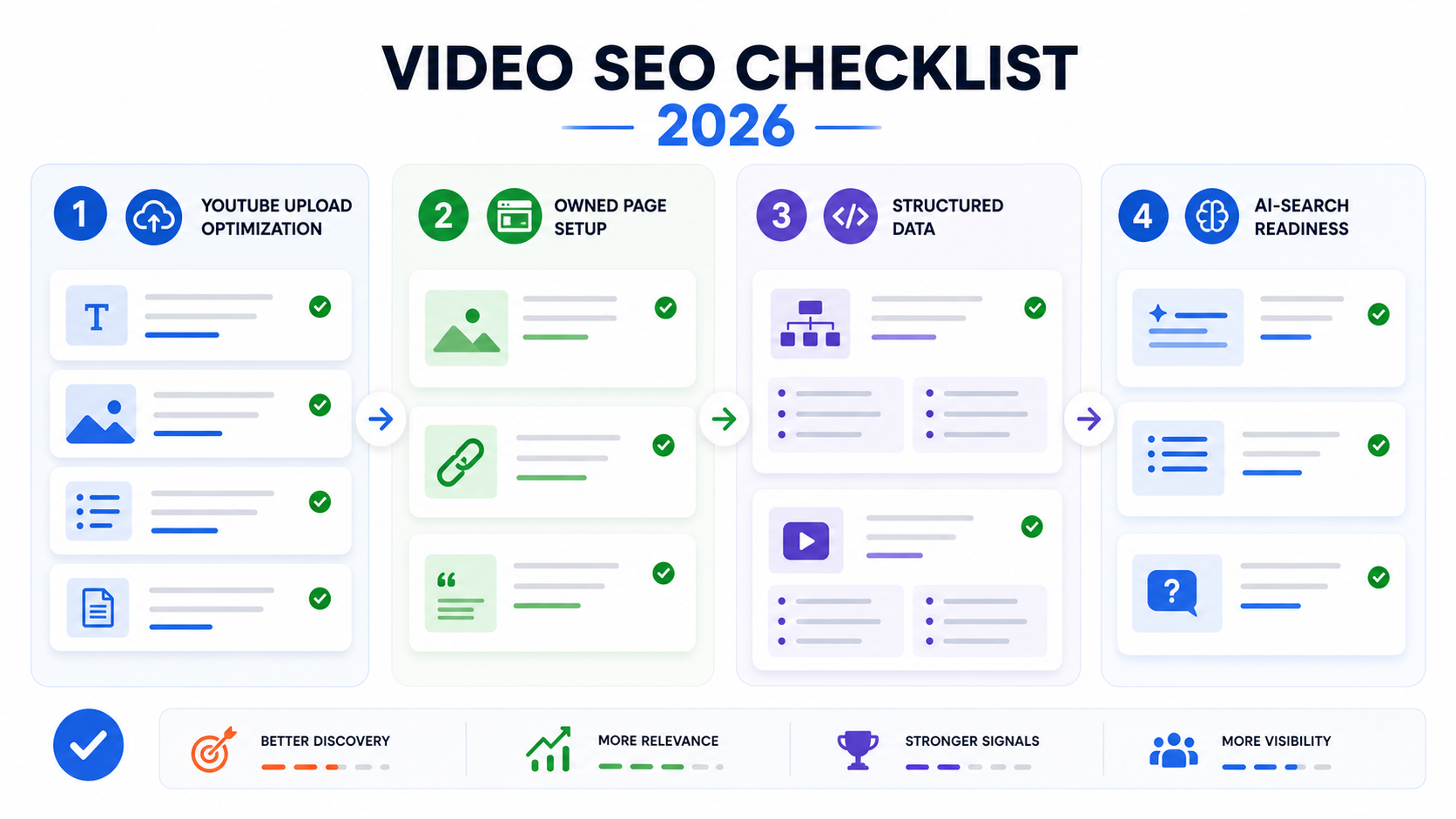
YouTube Upload
- The title leads with the topic and outcome.
- The description gives a plain-language summary, not just links.
- The first lines of the description reinforce the main query and user problem.
- Chapters use descriptive labels and useful timestamps.
- The thumbnail improves click confidence.
- The video is added to a relevant playlist.
- The description links to the supporting owned page if one exists.
- The pinned comment points users to the next best resource where useful.
Owned Page Setup
- The page has a clear H1.
- The video is embedded prominently.
- The intro explains who the video is for and what it answers.
- A direct-answer block appears near the top.
- The page includes a transcript, summary, or detailed supporting notes in HTML.
- Related pages link to the video page.
- The video page links back to relevant supporting resources.
- The page does not rely on the iframe alone to communicate the main value.
Structured Data And Technical Checks
VideoObjectis added on the owned page where appropriate.BlogPostingor article schema aligns with the page content where used.- Thumbnail URL is accessible.
- Upload date and description are accurate.
- The page is indexable.
- Canonical tags are correct.
- The embedded video loads on mobile.
- Schema does not claim anything that is not visible or supported on the page.
AI Search Readiness
- The page has a concise direct answer.
- Subheads match real questions.
- Important entities are named consistently.
- The page explains the relationship between the video and the topic.
- Checklists and tables make the answer easier to extract.
- Sources are linked where claims need support.
- The article does not bury the practical answer under a long preamble.
What I Would Refresh On Existing Video SEO Pages
Dean's GSC data already shows the opportunity.
The existing /blog/best-practices-for-youtube-video-seo page has visibility for queries like youtube seo best practices, video seo best practices, youtube seo checklist, youtube description best practices 2025, and youtube title best practices 2025.
The problem is not that Google cannot see the topic.
The problem is click capture.
For that page, I would refresh:
- Title and meta description to include the 2026 angle.
- Intro to explain that video SEO now includes YouTube ranking and AI-search source clarity.
- A direct-answer block near the top.
- A short section on Ask YouTube and conversational video search.
- Internal links to this new article with anchors like
video SEO for AI searchor2026 video SEO checklist. - Schema and transcript guidance if the page embeds videos.
For /blog/google-seo-best-practices-for-video, I would make the page more technical:
- Tighten the intro around crawlable video pages.
- Add clearer guidance on indexable embed pages.
- Add
VideoObjectand thumbnail checks for owned pages. - Link to this article as the practical YouTube/video SEO playbook.
- Connect the topic to image SEO, because thumbnails are part of video search presentation.
The refresh does not need to be huge. It needs to make the old pages feel current and connect them into the new article.
The Operating Principle
Treat every important video as three assets at once.
It is a YouTube asset. It needs a strong title, description, thumbnail, chapters, and engagement.
It is an owned-page asset if you embed it on your website. It needs crawlable text, useful context, schema where appropriate, and internal links.
And increasingly, it is a potential AI-search source. It needs to be easy to understand, segment, summarize, and cite.
That is the real shift.
Video SEO is not becoming less technical. It is becoming more connected.
The teams that win will not be the ones chasing hacks inside the upload settings. They will be the ones building clean video source packages: useful videos, clear metadata, strong owned pages, structured data, transcripts, and internal links that make the whole topic easier to understand.
Sources