
Creative DNA: Turn Your Best Ads Into Better Creative Briefs




Table of Contents (Click to show/hide)





Your best ad is bringing in sales. Now you need five more. What do you ask the designer or creator to repeat?
A brief that says “make something like this” leaves a lot to guesswork. The next ad might keep the colours and layout while changing the opening that caught people’s attention. You have another ad to run, but no clear question for it to answer.
Creative DNA helps you decide what to keep and what to test next. It breaks an ad into attributes such as its Hook, Message/angle, Offer and Copy, then connects those choices to the ad’s business results. Together with the actual image or video, that combination forms the ad’s fingerprint.
The benefit is a more useful starting point for the next brief. You can ask a creator to keep a promising opening and test a new headline. The person reviewing performance knows what changed. When a combination performs well across further tests, the team has something specific to reuse.
When to use Creative DNA
The method is most useful when you already have ads to learn from and need to decide what to produce next:
- A winning ad needs a follow-up. Identify the combination you want to carry forward, then choose one change to test. The next brief builds on a specific ad and result.
- You are paying for several creative variations. Give each variation a question to answer before production starts. You can explain why you need a different Hook, Offer or headline and what result will make it worth keeping.
- Media buyers, designers and creators need to work together. A shared card puts the ad, its attributes and the result behind the next brief in one place. The designer can see what “keep the opening” refers to without reconstructing a conversation or searching through old files.
The card earns its place when it helps you make one of those decisions. Start with a few ads you are actively reviewing; there is no need to catalogue your entire history first.
I created a Creative DNA playbook and ready-to-use testing workbook to help you turn your ad results into a clearer brief for your next creative. You’ll get worked examples for e-commerce and lead generation, plus templates to use with your own ads. Sign up to download both and start planning what to keep, what to change and what to test next.
The examples below use fictional ads and results to show the method in practice.
1. Break the ad into 11 attributes
An ad called “Video 04” tells a designer very little about why you want another version. Its attributes make the brief specific: which product, which audience, which benefit and which opening to build on.
Write those choices on a Creative DNA card and keep the actual copy and image or video with it. Here is a completed card for a desk-organiser video:
| Attribute | What it means | Desk-organiser example |
|---|---|---|
| Platform | Where the ad runs | Meta: Facebook Feed |
| Product/service | What you are selling or promoting | Desk organiser |
| Offer | The price, deal or incentive | Standard price; no discount |
| Target market | Who the ad speaks to | Home workers with a small desk |
| Awareness | What you expect them to know already | Problem-aware: they know their desk feels crowded |
| Message/angle | The main reason to choose the product | Make a small desk more usable |
| Hook | What people see or hear first | Problem-first: a cluttered desk |
| Creative style | How you present the message | Demonstration: show the organiser in use |
| Format and media | The type of ad and its actual image or video | Video, saved with the card |
| Copy | The words in the ad | Primary text, headline, description and on-screen text |
| CTA | The action you ask people to take | Shop now |
Product/service is what you sell. Offer is the deal: the same desk organiser could sell at full price, with 20% off or in a bundle.
The Hook and Creative style can change independently. A demonstration could open with a cluttered desk or with the finished, organised workspace. Both show the product in use; they use different openings to get attention.
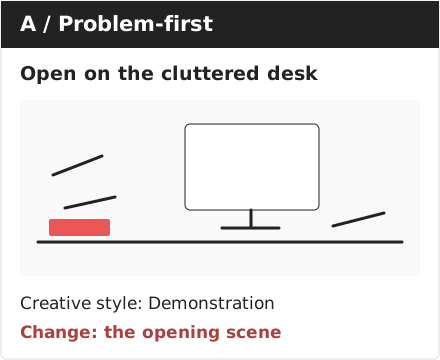
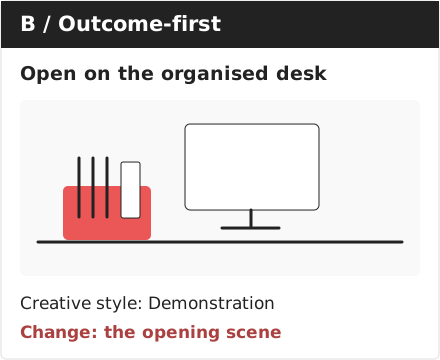
Format is another separate choice. You could demonstrate the organiser in a video or a sequence of carousel images. Keeping the actual file on the card gives the next creator a visual reference for the brief.
You do not need to complete the whole card again for every version. In the spreadsheet, save Platform, Product/service, Offer, Target market and Awareness together as a setup preset. Related ads can reuse those five answers.
2. Put each piece of copy in the right field
Different platforms and placements put text in different places. For a Meta Feed ad, record the primary text, headline and description separately. Also keep any words written inside the image or spoken in the video.
This gives the writer a smaller, clearer job. If you want to test a headline, they can see which words to change and which to keep. You can also reuse approved copy across related ads.
| Ad type | Copy to record |
|---|---|
| Meta single image or video | Primary text, headline and description, plus words inside the image or video |
| Meta carousel | Primary text and the headline and description for each card |
| Google responsive search | All headline and description options |
| Google responsive display | Short headlines, long headline, descriptions and business name |
Only fill in the fields your ad uses. If the copy already lives in an approved script or copy sheet, link to that version instead of typing it again.
For the desk organiser, keep all the words the same and change how the product appears in the video. Version A uses a wide shot of the organised desk. Version B uses a close-up of the organiser. The primary text, platform headline, description, CTA and on-screen text stay the same.
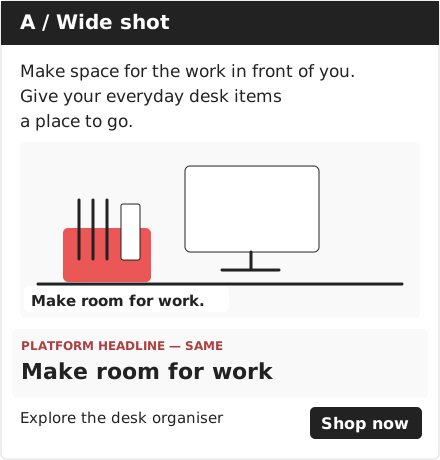
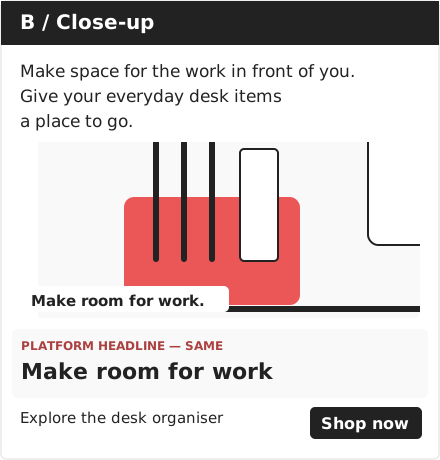
This gives you a specific question to test: does showing the organiser in more detail help sell it? The Copy attribute stays the same. Save the two video versions under Format and media so you can see which framing each ad used. Both still use the Demonstration Creative style.
Keeping copy separate from media makes this easier to manage. In the spreadsheet, save the shared words as one “Copy bundle” and reuse it for both ads. If you later change text inside the image or video, save the new wording and the updated media together.
Some ads, including Google responsive search ads, use several headline and description options. Keep all those options with the card. Google may show different combinations, so an overall ad result does not tell you that one particular headline caused the result.
3. Choose one attribute to test
Choose the business result first. For the desk organiser, you might want more purchases at an acceptable cost. For a service business, you might want more qualified enquiries.
Then choose one attribute that could help. If you think showing the finished desk will get more people interested, test the Hook. If the benefit is unclear, test the Message/angle. If people are interested but reluctant to buy, you might test the Offer.
Write the change in one sentence:
Change the Hook from a cluttered desk to an organised workspace to see whether showing the result first improves purchase results.
Make two versions of the ad. For this Hook test, keep the product, offer, copy, CTA and rest of the video the same. Save both videos with their cards so the opening is easy to compare.
Agree on the choices your team will use. “Problem-first” means showing the problem first; “Outcome-first” means showing the desired result first. Consistent names let you find other ads using the same approach when planning the next test.
The test also needs a fair setup. Keep the audience, placement, budget and timing comparable, and use the platform’s experiment tool where available. If you compare ads run for different audiences or at different times, treat the result as a reason to test further. You cannot confidently credit the creative change alone.
A useful variation gives you a decision either way. If the new Hook performs better, you have a reason to test it again. If it performs worse, you can return to the earlier opening before commissioning more ads around the new one. Changing the Hook, headline and discount together makes that decision harder.
4. Read CTR and CVR first, then check the business outcome
Use CTR and CVR for the first comparison. When you need to investigate further, follow the response from video views to clicks, site actions and cost.
CTR and CVR: definitions and counting rules
CTR = website clicks ÷ impressions. Click-based CVR = conversions from those clicks ÷ website clicks. CTR indicates click appeal; CVR helps assess the ad-to-page journey, including the offer and visitor intent. Match conversion actions, reporting periods and attribution windows. Exclude view-only conversions from click-based CVR, and check your platform’s denominator before comparing reports.
Step one: compare creative response
Return to the desk-organiser Hook test: A opens on the cluttered desk; B opens on the organised workspace. These fictional results belong to that test, not the separate wide-shot versus close-up example.
| Creative response | A: Problem-first | B: Outcome-first |
|---|---|---|
| Impressions | 20,000 | 20,000 |
| Clicks to website | 400 | 300 |
| CTR | 2.0% | 1.5% |
| Purchases from those clicks | 20 | 18 |
| Purchase CVR | 5.0% | 6.0% |
A attracts more clicks. B attracts fewer, but a higher proportion lead to a purchase. That gives you two observations to investigate, rather than one overall “winner”. Keep the landing page and offer unchanged during the creative test so changes there do not obscure the comparison.
Advanced: compare the path from video to action
Compare videos of similar length with one changed variable, keeping audience, placement, offer, landing page and measurement settings comparable. For images, skip the video metrics. Choose one goal at a time: add to cart, checkout, purchase, lead, qualified lead, sales-qualified lead or subscription.
| Group | Useful comparisons | What to investigate |
|---|---|---|
| Video response | 3-second plays ÷ impressions; landing-page views or goals ÷ plays at 3 seconds, 25%, 50% or 100% | Whether attention is accompanied by visits and actions |
| Click conversion | Landing-page views ÷ outbound clicks; goals ÷ outbound clicks | The response after a click leaves the platform |
| Site conversion | Goals ÷ landing-page views | Whether the page and offer fulfil the ad’s promise |
| Cost | Spend ÷ unique outbound clicks; spend ÷ unique landing-page visitors or goal completers, where available | The cost of bringing in people who take the next step |
For the desk videos, suppose A has 3,600 plays at 25% and 320 landing-page views, versus 4,200 and 270 for B. That is 8.9 versus 6.4 visits per 100 plays. B records more plays at that point; A produces more visits relative to its viewing count. Investigate the promise and CTA.
These ad-level ratios cannot prove which video segment caused an action. At 20 seconds, the 25% milestone is five seconds, which is not automatically the Hook.
Reading the ratios and unique costs correctly
Landing-page views ÷ 25% plays gives visits per play; the reverse gives plays per visit, where lower means fewer plays per visit. Neither is a viewer conversion rate without linking the same viewers to the actions.
Use outbound clicks for clicks leaving Meta. Calculate cost as spend ÷ the chosen count, not cost per click divided again. Keep event totals separate from unique-person counts. If deduplicated visitors or goal completers are unavailable, use clearly labelled total-event costs. Match reporting periods and attribution windows.
Step two: do those conversions support the business goal?
Use ten of the action being compared per variation as a starting point for provisional review, including the counts behind CVR. This means ten qualified leads when judging lead quality. Allow equal conversion time and check experiment confidence before declaring a winner; ten is not proof of significance. Platform requirements can be higher (see References).
Both desk ads pass the ten-purchase starting point. Now add the business context:
| Business outcome | A: Problem-first | B: Outcome-first |
|---|---|---|
| Ad spend | $600 | $600 |
| Revenue from the purchases above | $1,600 | $1,800 |
| Cost per purchase | $30.00 | $33.33 |
| Revenue / ad spend | 2.67 | 3.00 |
| Gross profit less ad spend, assuming 50% gross margin | $200 | $300 |
A has the lower cost per purchase. B has more gross profit left after advertising under the margin assumption, before other business costs. But B’s customers also spent more per order. That could reflect who happened to buy; it does not prove the opening caused higher-value purchases.
For the next brief, B’s opening is worth testing again because its CVR is promising. Check whether that response holds with more data, then consider the business outcome before committing to a larger production batch.
Lead generation: follow clicks through to qualified enquiries
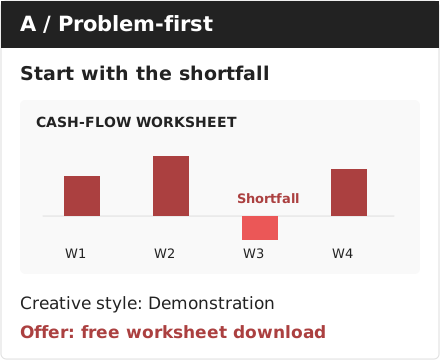
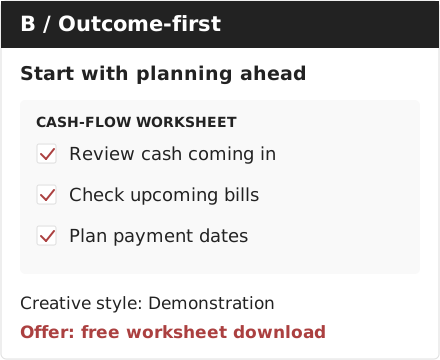
The same sequence applies to a free cash-flow worksheet. A opens with a cash shortfall; B opens with planning ahead. Keep the worksheet, other ad content and website form the same.
| Creative response | A: Problem-first | B: Outcome-first |
|---|---|---|
| Impressions | 20,000 | 20,000 |
| Clicks to website | 600 | 400 |
| CTR | 3.0% | 2.0% |
| Completed forms from those clicks | 30 | 20 |
| Form CVR | 5.0% | 5.0% |
A generates more clicks; both have 5% form CVR and exceed ten forms. Next, check lead quality:
| Business outcome | A: Problem-first | B: Outcome-first |
|---|---|---|
| Ad spend | $600 | $600 |
| Qualified leads | 6 | 10 |
| Cost per completed form | $20 | $30 |
| Qualification rate | 20% | 50% |
| Cost per qualified lead | $100 | $60 |
B looks promising on lead quality, but A has only six qualified leads. The comparison has not reached the ten-qualified-lead minimum for each variation. Keep collecting data before choosing a creative on that basis, using the same qualification rules and follow-up time for both.
Keep the openings connected to these observations in Creative DNA. The next decision is to continue the comparison.
5. Build on the combination that works
Return to the desk-organiser example. Suppose further tests support the organised-workspace opening’s CVR, with enough purchases to assess the result and acceptable business outcomes. Use that version as the starting point for the next ad.
Keep the successful combination together on the card: the desk organiser at standard price, the small-desk audience, the usable-space message, the Outcome-first Hook and the Demonstration style. Save the matching video and copy with it.
Your next brief could be:
Keep the organised-workspace opening, all the copy and the rest of the ad. Change the opening shot from a wide view of the desk to a close-up of the organiser. Compare CTR and purchase CVR first, then check purchase cost and gross profit after advertising once there is enough data.
That next test has no result yet. If it improves the outcome, keep the close-up. If it does not, you still have the earlier version to return to. Keep that decision with the card so the next person can see what you tried and why you kept or dropped it.
Over time, the cards show which combinations have performed well for particular products, audiences and offers. You can reuse those combinations in new ads and test whether the results hold. A combination that works for one product still needs checking when the product, audience or offer changes.
Try it on your next creative brief
Choose three ads for the same product and business goal: one strong performer, one weaker performer and one you are unsure about. Use the PDF guide to complete their cards, then compare the attributes alongside their results. Differences give you questions to test; they do not prove which attribute caused the result.
Pick one question and write the next brief. Name the ad you are building on, what to keep, what to change and the result you will judge. You should finish with a production decision you can explain to someone else.
The spreadsheet helps you reuse the shared information as you add variations. For ideas on producing them, see the Facebook and TikTok creative playbook.
If your team keeps finishing performance reviews without knowing what to make next, get in touch. We can work through your ads and results together and turn them into a prioritised set of creative tests and production briefs.
References
Google Ads defines CTR and CVR. Check the denominator used in your report.
Google Ads explains experiment confidence and the conversion requirements for video experiments. The ten-conversion starting point in this guide is a working rule, not Google’s threshold.
Google Ads: responsive search ads explains headline and description options.
Google Ads: responsive display ad assets and responsive display ads cover the text and images these ads use.
Meta’s official Ads Insights field reference lists video milestones, outbound clicks and unique-click cost fields. The advanced matrix uses custom ratios; it does not imply viewer-level tracking or that every unique metric is available.
Meta’s official Business SDK lists the separate link-ad copy fields, copy options and carousel card fields.
Webprofits: Creative DNA inspiration from the Meta Scaling Masterclass reference material.